In this article
- Pubbly vs. CapCut at a glance
- Where CapCut is better
- Filming: who appears on camera
- Ready or manual editing
- Planning and carousels
- Publishing and comments
- How to use CapCut for Instagram (and where it stops)
- Pricing: Pubbly vs. CapCut
- Choose Pubbly if
- Choose CapCut if
- Can you use both?
- Frequently asked questions
- How we compared
Updated on November 15, 2026.
The short answer: Pick CapCut if you like editing by hand and want full control of the timeline, effects and templates. Pick Pubbly if you want the video finished, with your clone, captions, cuts and scene overlays, plus carousels, a monthly plan and publishing to Instagram, Facebook, TikTok and YouTube.
Pubbly vs. CapCut at a glance
| Criteria | Pubbly | CapCut |
|---|---|---|
| Starting price | $9/monthStarter plan, or $79 billed yearly | FreePaid CapCut Pro |
| Videos with your face and voice without filming | ✓AI clone from 1 recording | ×You film every video |
| Video editing (captions, cuts, scenes) | ✓Automatic, on brand | Manual, with auto captions |
| Fine timeline control and effects | Quick tweaks on the finished video | ✓Full editor, many effects |
| Monthly content plan | ✓Ready calendar based on your niche | ×No |
| On-brand carousels and posts | ✓Colors, fonts and logo applied | Templates you build |
| Schedule and post to Instagram, Facebook, TikTok and YouTube | ✓Yes | You export and post |
| Reply to comments and send links by DM | ✓Automatic, 24/7 | ×No |
| Free plan | ×No | ✓With limits and paid Pro features |
Where CapCut is better
- A full editor with timeline, effects, transitions, music and ready templates.
- Total control over every cut and detail.
- It has a free version and works on phone and desktop.
Filming: who appears on camera
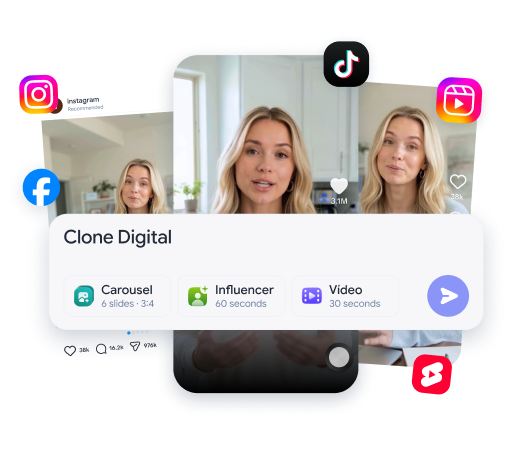
CapCut edits what you film; Pubbly films for you. With Pubbly you record once and your clone, with your face and voice, films the next videos. In CapCut every video starts with you filming, with lighting, camera and retakes.
See how it works: ai clone.
Ready or manual editing
In CapCut editing is your job; Pubbly delivers the edited video. Pubbly applies dynamic captions, cuts, transitions and scene overlays automatically in your brand style. CapCut has auto captions and templates, but pacing every Reel on the timeline is still on you.
See how it works: ai video generator.
Planning and carousels
CapCut doesn't tell you what to post or build carousels for you. Pubbly builds the monthly calendar from your niche and creates carousels with your colors, fonts and logo. In CapCut you decide what to make and build every piece.
Publishing and comments
CapCut ends at the export. In Pubbly, Reels, carousels and Stories are published to Instagram, Facebook, TikTok and YouTube on time, and comments get replies and DM links.
How to use CapCut for Instagram (and where it stops)
If you keep editing in CapCut, these tips save time.
- Create a template with your caption fonts and colors and reuse it in every video.
- Use auto captions and only fix the wrong words.
- Cut the silences and keep the hook in the first 3 seconds.
Even so, filming, planning, carousels, publishing and replying to comments are still on you. That is the part Pubbly automates.
Pricing: Pubbly vs. CapCut
- Pubbly: from $9 per month on the Starter plan, or $79 per year, with edited clone videos, carousels, scheduling and auto-replies.
- CapCut: free version with limits and paid CapCut Pro with advanced features and more storage. Current prices are on CapCut's website.
The fair math: CapCut is cheap, but it costs time. Filming and editing every video by hand takes hours a week.
Choose Pubbly if…
- You want to post daily without filming and editing daily.
- You want the video finished, with captions and scenes.
- You also want carousels, planning and publishing.
Choose CapCut if…
- You enjoy editing and want full control.
- You make videos with lots of effects and creative edits.
- You want to start for free.
Can you use both?
Yes. Use CapCut for special videos with lots of effects and Pubbly for everyday content, finished and published.
Frequently asked questions
Is CapCut worth it?
Yes, if you enjoy editing and want full timeline control. To post daily, filming and editing every video by hand takes hours a week.
Why is Pubbly better than CapCut?
Because Pubbly films with your clone and delivers the edited video, with captions, cuts and scenes, plus carousels, planning, publishing and comment replies.
Which is better: Pubbly or CapCut?
Pick CapCut if you like editing by hand and want full control of the timeline, effects and templates. Pick Pubbly if you want the video finished, with your clone, captions, cuts and scene overlays, plus carousels, a monthly plan and publishing to Instagram, Facebook, TikTok and YouTube.
Is Pubbly a CapCut alternative?
Yes, for people using CapCut to make social videos who want to stop filming and editing everything themselves.
Does CapCut edit videos automatically?
Partly. CapCut has auto captions and templates, but you assemble the video on the timeline. In Pubbly the video comes out edited.
How much does Pubbly cost?
Pubbly starts at $9 per month on the Starter plan, or $79 on the annual plan. Larger plans add more videos and brands.
How we compared
We compared what matters to people creating content for Instagram, Facebook, TikTok and YouTube: filming, editing, planning, carousels, publishing and replying. CapCut information comes from its official website, checked in November 2026. Features and prices change; when they do, we update this page.
Sources: CapCut · CapCut Pro · November 15, 2026.